

Advancing Proactive Security with Avigilon Unity’s New Visual Alerts Feature
MCA offers our customers a carefully researched portfolio of innovative voice, data, and security solutions. Our partnership with leading manufacturers like Avigilon allows us to deliver advanced technologies that enhance workplace safety and operational efficiency. A significant challenge in modern security is shifting from reactive response to proactive prevention. Organizations need systems that can identify potential risks before they escalate into critical incidents. Avigilon has addressed this need directly with a powerful new feature in their Unity Video platform released in July of 2025.
So, what is this solution? It’s the Visual Alerts feature in Avigilon Unity Video 8.7. This advanced capability leverages generative AI to transform video surveillance into an intelligent, proactive monitoring tool. It allows security teams to move beyond simple motion detection and identify complex, specific events by describing them in natural language, enabling a new level of situational awareness and rapid response.
Understanding Avigilon’s Visual Alerts
Visual Alerts is an AI-powered feature designed to provide proactive detection of security, safety, and operational risks by analyzing a camera’s entire field of view. Unlike traditional analytics that are limited to pre-defined objects like people and vehicles, Visual Alerts uses generative AI to understand complex scenes, relationships, and anomalies.
The core of this technology is its text-based prompt system. Operators can create a custom alert by simply describing the object, activity, or condition they want to monitor. When the system detects a match for the described scenario, it generates an event within the Avigilon Unity Video platform. This creates a highly flexible and precise monitoring environment tailored to the unique needs of any facility.
Key Applications and Use Cases
The versatility of Visual Alerts allows for its application across a wide range of scenarios, enhancing safety and operational oversight. Our teams see immediate value in several key areas:
- Safety and Hazard Detection:
- Slip and Fall: Configure an alert for a “person lying down on the floor” to enable rapid medical response.
- Smoke and Fire: Create alerts to detect early signs of “smoke” or “fire,” providing crucial extra moments for evacuation and emergency service notification.
- Flood Monitoring: An alert for “water pooling on the floor” can help prevent significant asset damage in server rooms or storage areas.
- Security and Intrusion Detection:
- Unauthorized Access: Set an alert for a “person climbing a fence” or a “vehicle parked in a restricted zone” to immediately notify security personnel of a potential breach.
- Suspicious Activity: Define alerts for specific behaviors, such as “a person loitering near an entrance after hours,” to investigate potential threats.
- Operational Efficiency:
- Crowd Management: An alert for “high crowd density” or “unusual crowd growth” can help manage pedestrian flow and identify potential safety issues in public venues or retail spaces.
- Specific Object Monitoring: For a logistics hub, an alert for “a pallet left in a fire lane” can ensure compliance and prevent hazards.

How Visual Alerts and Focus of Attention Work Together
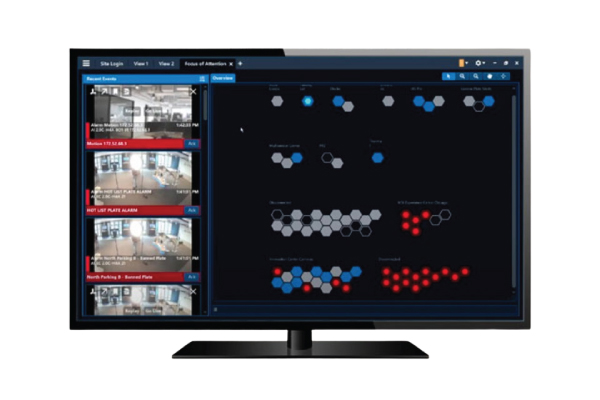
The true power of this solution is realized when Visual Alerts are integrated with Avigilon Unity Video’s Focus of Attention (FoA) interface. The FoA provides operators with a consolidated, high-level overview of all cameras and sites, using a system of color-coded hexagons to represent camera status and events. This interface is designed to cut through the noise of constant video streams and draw immediate attention to what matters most.
The Focus of Attention Hexagon System
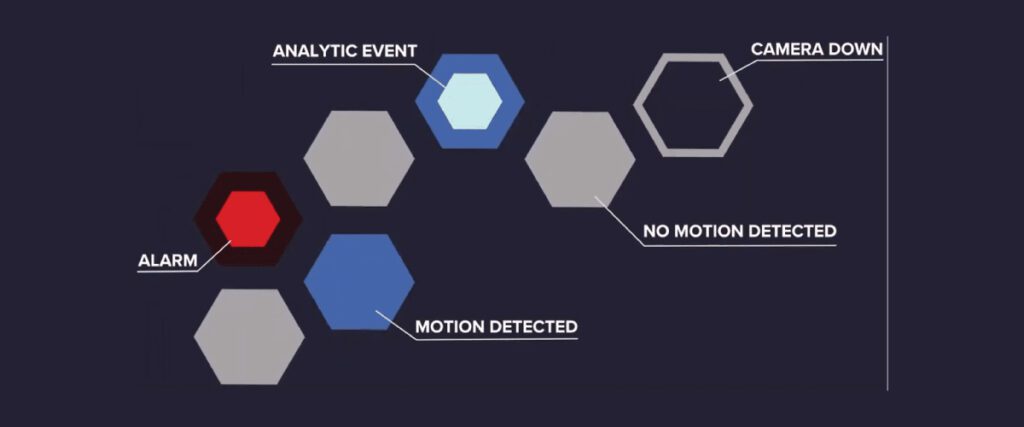
The FoA interface translates thousands of data points into an intuitive visual language. Each hexagon represents a camera, and its color indicates the type of event occurring. This system ensures operators can assess the overall status of their site at a glance.
- Yellow Hexagons: These signify a Visual Alert has been triggered. This could be anything from the “cyclist in the parkade” scenario to a fire detection event. The yellow color serves as a clear warning that requires investigation.
- Red Hexagons: This color is reserved for active alarms, indicating a critical event that demands immediate operator acknowledgment and action.
- Teal Hexagons: These represent other video analytic detections, such as unusual motion or standard crowd size events.
- Blue Hexagons: Indicates basic pixel motion detection.
- Gray/Colorless: Represents a camera with no active event or one that is offline.
When a Visual Alert is triggered—for example, by detecting smoke in a warehouse—the corresponding camera’s hexagon in the FoA overview immediately turns yellow. Simultaneously, the interface displays the alert name, camera location, and a live video feed of the event. This seamless integration allows an operator to instantly understand the what, where, and when of an incident, facilitating a swift and well-informed response.
From Detection to Action: Automated Workflows
Visual Alerts are not just a notification tool; they are a component of a larger, automated security ecosystem. Each event generated by a Visual Alert can be used as a trigger within Unity’s robust rule engine. This enables the creation of automated workflows that enhance response protocols and ensure consistency.
For example, an alert for “a car on fire in the parkade” can be configured to:
- Immediately display the live video on the primary security monitor.
- Trigger an audible alarm in the security operations center.
- Send an automated email notification with a video snapshot to the facility manager.
- Initiate an API call to activate the building’s emergency lighting system.
This level of automation ensures that critical actions are taken without delay, even if an operator is attending to another task. It combines the discerning power of AI with the reliability of automated processes to create a comprehensive security response solution.
The Future of Intelligent Security Monitoring
The introduction of Visual Alerts in Avigilon Unity Video 8.7 represents a significant advancement in security technology. By integrating descriptive, AI-driven analytics with the intuitive Focus of Attention interface and a powerful rules engine, Avigilon has created a holistic solution that empowers security teams to be more proactive, efficient, and effective. This technology moves surveillance from a passive recording tool to an active participant in securing an environment.
At MCA, we provide solutions like Avigilon Unity Video to address complex workplace challenges. The Visual Alerts feature is just one example of the innovative technologies we offer. Every environment is unique, so this solution may be ideal, or another technology from our wide range of partners may better suit your needs. A consultation with our expert team will help identify the best option for improving your organization’s security and efficiency.
Frequently Asked Questions: Avigilon Unity Video Visual Alerts
Visual Alerts are an advanced AI-driven capability within Avigilon Unity Video 8.7 that allow operators to detect specific objects, activities, or anomalies by describing them with natural language prompts. The system analyzes the full field of view, automatically generating alerts when defined scenarios are identified—enabling security teams to move from reactive to proactive responses.
To set up Visual Alerts:
– Access the Unity Video Client and log in to your AI Appliance 2X.
– Navigate to Site Setup and select the appropriate AI Appliance.
– Under the Server Analytics section, choose the Visual Alerts tab and enable the feature for your selected cameras.
– Use text-based prompts to define the objects, activities, or anomalies for the system to watch.
– Configure rules and automated workflows using Unity’s rule engine to determine how alerts are delivered and acted upon.
Visual Alerts support a diverse range of applications, including:
– Slip and fall detection (person lying on the floor)
– Smoke and fire detection
– Flooding or water accumulation
– Intrusion or unauthorized access
– Crowd density or unusual crowd growth
– Specific object or behavior detection, such as vehicles or restricted activities
The flexibility of prompt-based configuration ensures the system can be tailored to site-specific operational, safety, and security requirements.
When a Visual Alert is triggered, it appears as a yellow hexagon in the Focus of Attention overview, providing at-a-glance awareness for operators. The FoA interface displays critical alert information, including the alert name, camera location, and a live or recent event video. Operators benefit from color-coded status indicators and can immediately identify, investigate, and respond to events through an intuitive and centralized platform.
Yes. Visual Alert events can serve as triggers in Unity Video’s comprehensive rules engine. These can:
– Display live video for operator review
– Initiate alarms within the security operations center
– Send notifications via email or other channels
– Integrate with external systems through API calls
Automation ensures timely, consistent responses and reduces reliance on manual operator actions during critical events.
Visual Alerts can be enabled across any Unity-compatible cameras that have the correct analytics licenses and hardware support. The Focus of Attention interface groups cameras by site and shows all active alerts, allowing for multi-site and multi-camera oversight from a single dashboard.
Visual Alerts requires UNITY8-ENT licenses and is supported on compatible hardware such as the AI Appliance 2X. Only cameras and sites that meet these prerequisites will display the Visual Alerts tab for configuration.
Visual Alerts are designed to provide flexible, scalable, and intelligent security for many environments—from logistics hubs to parking structures, campuses, and warehouses. During a consultation, MCA’s experts will evaluate your specific needs and provide guidance on whether Visual Alerts, or another solution from our portfolio, best addresses your operational and security goals.
If you have additional questions or want to see a demonstration, please contact MCA to connect with one of our solution consultants.
About MCA
We believe every workplace should be safe, secure, and efficient. As trusted advisors, we deliver integrated communication, connectivity, and security solutions with a Service First mindset – driven by a team that cares deeply about our customers and each other.
Why MCA? At MCA, we help solve critical communication, connectivity, and security challenges with turnkey, integrated system solutions—from two-way radios and in-building wireless to video surveillance, access control, and more. MCA is built from over 50 companies with deep technical expertise and strong local roots. And we’re still growing—expanding our capabilities, our reach, and our team.
Our 100+ Solution Centers bring together sales, installation, service, and customer operations teams to deliver seamless, nationwide support. Guided by our Service First value, we don’t just connect the wires and walk away—we provide customized solutions backed by deep expertise and lifecycle support.
