

Preventative Steps to Protect Equipment Can Save Time and Money
When undertaking renovations or construction projects, protecting your existing DAS infrastructure is essential to avoid damaging the individual components. Unfortunately, it’s pretty common for coaxial cables or antennas to be damaged during construction – especially across large campuses where there seem to be continuous improvements or renovations occurring.
By taking on a few extra steps and small expenses to protect your equipment during the construction and renovation, you’ll likely save your organization a substantial amount of money by avoiding costly repairs or replacements.
Why Are DAS Repairs So Expensive?
There is a common misconception among construction workers that replacing coaxial cables disrupted during renovation is a quicker and more cost-effective solution than taking preventative measures to avoid damage in the first place. However, workers often opt to cut cables in their way, preserving only the antennas. The reasoning is that the cables are relatively inexpensive – and while that’s true, the cost of replacing the cables coupled with the installation time, expense, and the subsequent testing costs once the system installation is complete drives up the overall cost.
Whether installing a new DAS or addressing partial damage due to construction or other causes, DAS integrators must conduct tests to guarantee signal quality and overall system performance.
Three tests are most common for carrier-grade DAS:
- Sweep and PIM (Passive Intermodulation) tests for coaxial cable in multiple frequencies
- OTDR and Optical Loss Tests for fiber
- CW (Continuous Wave) test on the completed system
These tests identify faults or defects in the system, ensure signal continuity at intended frequencies, minimize signal loss during transmission, and reduce interference. Depending on the nature of the damage, conducting one or all three tests may be necessary and – whether purchased or rented – the equipment required for these tests is quite expensive.
How To Minimize DAS Repair Costs
The most straightforward and effective way to minimize DAS repair costs is to contact the individuals responsible for maintaining the Distributed Antenna System (DAS) or contact the original system integrator who constructed the DAS before you start any construction. By speaking with them, you can ensure that your contractors and their teams know exactly where vital equipment and cables are located so that nothing is accidentally (or intentionally) damaged.
If you cannot contact the team who originally installed the system, follow the steps below to do your due diligence in determining where equipment is located.
Survey the Area and Identify Potential Affected Areas
It’s essential to recognize that the impact on the DAS may extend beyond the immediate renovation area. Take a comprehensive look at the surroundings to identify potential affected zones.
Check for a Close-out Package
Inquire with the customer about the availability of a close-out package for the DAS. This package typically includes an as-built drawing that provides a detailed layout of the DAS elements, including the location of fiber housing, electronics, coaxial cables, splitter/couplers, and antennas.
Visual Inspection in the Absence of Documentation
If there is no documentation available, conduct a visual inspection of the elements within the planned renovation area. This may involve accessing the ceiling space and inspecting the IDF or telecommunications closet.
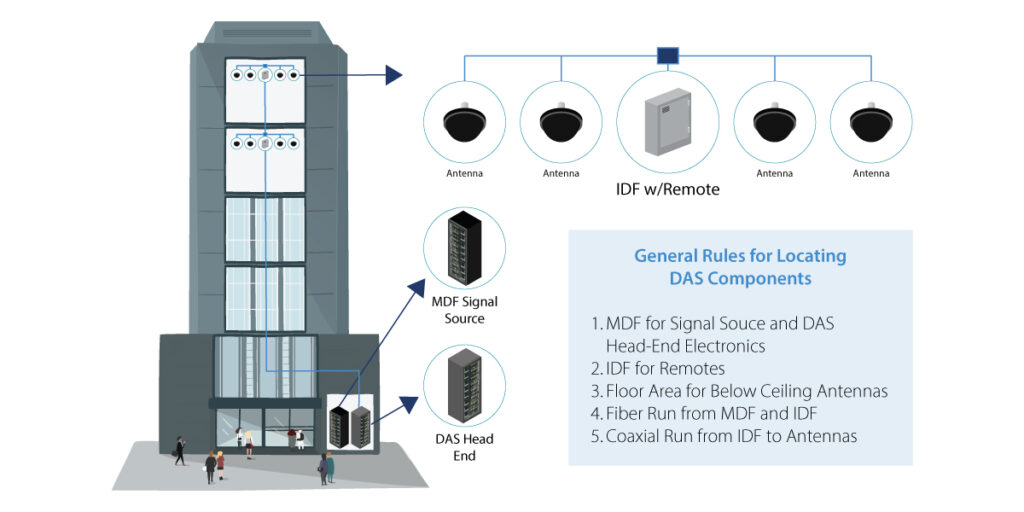
Common Elements of DAS Systems
When identifying the components of the DAS system, it’s important to know what you’re looking for and where to look.
Electronics and Fiber Hub
The DAS electronics are typically housed in regular telco or Intermediate Distribution Frame (IDF) closets or in ceiling areas. In many instances, these electronics take the form of mid or high-power remotes, and – when dealing with wall or rack-mounted remotes – it’s common for them to serve multiple antennas.
To preserve the remote during construction, the best approach would be to turn it off and completely remove it from the work area. However, special consideration is needed when the remotes serve multiple antennas, as it’s important not to shut off the remote indiscriminately. For instance, if a remote serves six antennas, and the renovation area involves only three, shutting off the remote would result in signal loss for the remaining three antennas outside the construction area, potentially affecting a substantial coverage area. Since an antenna could cover over 5,000 square feet, disrupting signal coverage for a sizable area should be avoided.
When turning off the remote would disrupt coverage, efforts should be made to protect it from dust without impeding necessary air circulation. However, you should avoid simply wrapping it in plastic, as these remotes generate heat and require proper ventilation.
Fiber Housing
Ensure that the fiber housing close to the electronics has a dust cover, and ensure that workers know not to remove the jumpers going from the remote to the fiber housing.
Coaxial Cable
Although coaxial cable appears sturdy, it can be easily damaged. Workers should not stand on the wires, as this can damage the cable to the point where the transmission is disrupted. Similarly, cables should not be bent or kinked as this will impact the signal traveling through. And, most importantly – as mentioned above – unless there are plans to replace cables and re-test the entire system, it’s imperative that workers do not cut the cables.
Antennas
In most cases, antennas are usually positioned beneath a ceiling tile. During construction, they can be carefully raised above the ceiling tiles and secured to the ceiling to keep them out of the way and protected.
About MCA
MCA is one of the largest and most trusted DAS integrators in the United States, offering world-class voice, data, and security solutions that enhance the quality, safety, and productivity of customers, operations, and lives.
More than 65,000 customers trust MCA to provide carefully researched solutions for a safe, secure, and more efficient workplace. As your trusted advisor, we reduce the time and effort needed to research, install, and maintain the right solutions to make your workplace better.
Our team of certified professionals across the United States delivers a full suite of reliable technologies with a service-first approach. The MCA advantage is our extensive service portfolio to support the solution lifecycle from start to finish.
